About

// the infrastructure

The HomeLab

A peek behind the curtain — the hardware, network, and self-hosted services that power my corner of the internet.

Last updated: August 31, 2026

In 2026, thanks to my old Windows 10 box which basically operated as a Network Attached Storage (NAS) device for my household deciding to have its OS drive die, which then cascaded into motherboard issues, I got deep into home lab deployments and self hosted software. I'm no expert but I've been spending time learning about linux, managing head-less machines via CLI and deploying a proper NAS using Unraid. Here's a look at what is running and how I've built it out so far.

Storage & Docker Philosophy

All the media and app data lives on network-mounted drives on a Terramaster NAS running Unraid. The local SSDs on each Docker host are intentionally locked down — if the NAS ever drops offline, containers get a clean "permission denied" instead of silently filling up the host's root drive.

Everything runs as Docker Compose "micro-stacks" — each logical group of services (media, monitoring, network, and so on) gets its own isolated compose file and directory, rather than one giant compose file for everything. I know that Proxmox is a popular alternative to running Ubuntu and docker containers, and I hope to explore that one day too.

Machines are networked together over Tailscale, and anything exposed to the outside world goes through Cloudflare Tunnels with Zero Trust access policies — no ports forwarded directly to any of this.
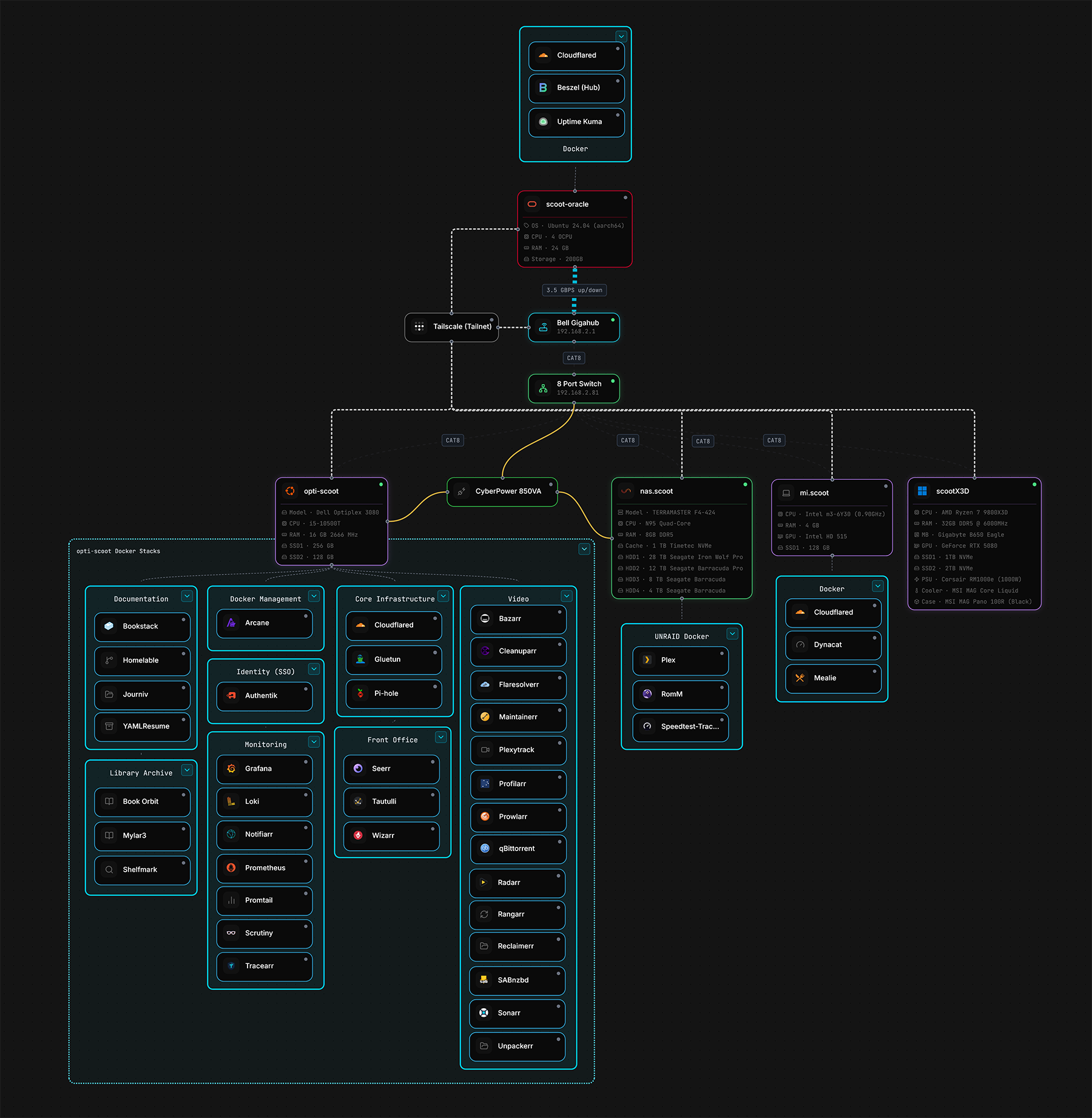

Network Map

Homelab network map

Machines

opti-scoot

The primary Docker host, running Ubuntu — handles the bulk of self-hosted services across isolated micro-stacks (media, monitoring, network, documentation, and more). Networked over Tailscale.

Model: Dell OptiPlex 3080

CPU: Intel Core i5-10500T

RAM: 16GB

Storage: 256GB SSD + 128GB SSD

Services

Arcane
Authentik
Bazarr
BookStack
Book Orbit
Cadvisor
Cleanuparr
Cloudflared
FlareSolverr
Gluetun
Grafana
Homelable
Journiv
Maintainerr
Notifiarr
Pi-hole
Profilarr
Prometheus
Prowlarr
qBittorrent
Radarr
Rangarr
Reclaimerr
SABnzbd
Scrutiny
Seerr
Shelfmark
Sonarr
Tautulli
Tracearr
Unpackerr
YAMLResume
Wizarr

scootNAS

Network-attached storage on a Terramaster NAS chassis running Unraid — hosts the Plex media library plus a handful of storage-adjacent services.

Model: Terramaster F4-424

CPU: Intel N95 (Quad-Core)

RAM: 8GB DDR5

Network: 2× 2.5GbE

Disk 1: 28TB Seagate IronWolf Pro (New)

Disk 2: 12TB Seagate Barracuda Pro (Refurb)

Disk 3: 8TB Seagate Barracuda (Refurb)

Disk 4: 4TB Seagate Barracuda (Refurb)

Cache: 1TB Timetec NVMe

Services

Cadvisor
Plex
RomM
Speedtest Tracker

mi-scoot

Headless server and HomeLab dashboard display for easy monitoring at a glance. Also runs some less demanding services where possible to offload work from opti-scoot. Networked over Tailscale.

Model: Xiaomi Mi Notebook Air

CPU: Intel m3-6Y30 @ 0.90ghz

RAM: 4 GB DDR3

Storage: 128 GB SSD

Services

Cadvisor
Cloudflared
Dynacat
Mealie

scoot-oracle

A lightweight, always-free Oracle Cloud instance (ARM, Ubuntu 24.04) used purely for external monitoring — keeping an eye on the homelab from outside the network.

Provider: Oracle Cloud (Always Free)

CPU: 4 OCPU

RAM: 24GB

Network: 4Gbps Bandwidth

Storage: 200GB Boot Volume

OS: Canonical Ubuntu 24.04 Minimal (aarch64)

Services

Beszel
Cloudflared
Postiz
Uptime Kuma